 alice.pds.demo.boltless.dev
This repository has no description
1---
2atroot: true
3template:
4slug: spindle-microvm
5title: Tangled CI runs on microVMs
6subtitle: How we built spindle's new QEMU-based microVM engine
7date: 2026-06-16
8image: https://assets.tangled.network/blog/microvm.png
9authors:
10 - name: dawn
11 email: dawn@tangled.org
12 handle: ptr.pet
13---
14
15Spindles are the self-hostable CI runners. It now supports a
16new mode of execution using QEMU MicroVMs. With the new
17microVM engine, each workflow gets its own little virtual
18machine, a whole real environment you can do anything
19inside.
20
21The interesting part is NixOS images: you configure the
22machine directly from the workflow file. A few things you
23can do:
24
25You can bring services up:
26
27```yaml
28services:
29 postgresql:
30 enable: true
31 ensureDatabases: ["spindle-workflow"]
32 ensureUsers:
33 - name: spindle-workflow
34 ensureDBOwnership: true
35```
36
37You can build Docker containers:
38
39```yaml
40virtualisation:
41 docker: true
42steps:
43 - name: "do the thing!"
44 command: docker build ...
45```
46
47And you can use non-NixOS images:
48
49```yaml
50image: alpine
51steps:
52 - name: install golang
53 command: apk add go
54```
55
56It's an upgrade from the existing Nixery engine while
57staying fully compatible with it, so if you already have a
58working Nixery workflow, just change `nixery` to `microvm`
59and it will work!
60
61It's quick on the second run, too, because it caches aggressively: your
62dependencies, your services, and any other Nix derivation built inside the
63microVM get pushed to spindle's Nix cache, so the next workflow that needs them
64doesn't rebuild those. More on that [below](#the-nix-cache-both-ways).
65
66And like everything else in Tangled, the whole thing is self-hostable, so you
67can run your own spindle with the microVM engine on your own hardware (see the
68[self-hosting
69guide](https://docs.tangled.org/spindles.html#self-hosting-guide)). If you want
70fuller examples, there are [recipes in the
71docs](https://docs.tangled.org/spindles.html#recipes) too.
72
73## What's in a microVM
74
75A microVM is just a VM with most of the boring parts removed. There's no BIOS,
76no PCI bus to probe, no emulated graphics card, none of the slow legacy stuff a
77normal QEMU machine drags along. You get virtio devices and not much
78else, which means it boots very quickly and uses very little memory. Right now
79QEMU is the only runner we support, but the engine is written so that other
80runners (firecracker for example) can slot in later.
81
82Inside the guest there's a small piece of software we call the agent. Spindle
83never SSHes in or runs commands "from the outside"; instead the agent dials back
84to spindle over vsock the moment it boots, says hello, and from then on every
85step of your workflow is sent to it as a message. The agent runs the command as
86an unprivileged user, streams stdout and stderr back, and reports the exit code.
87The host side of this lives in
88[`spindle`](https://tangled.org/tangled.org/core/tree/master/spindle/engines/microvm/agent.go)
89and the guest side is a little Rust binary called
90[`shuttle`](https://tangled.org/tangled.org/core/tree/master/shuttle).
91(`shuttle` implements
92[`agentproto`](https://tangled.org/tangled.org/core/tree/master/spindle/) which
93is the protocol used by `spindle`. Technically speaking anyone could implement
94this and, assuming side effects hold, you could have your own agent!)
95
96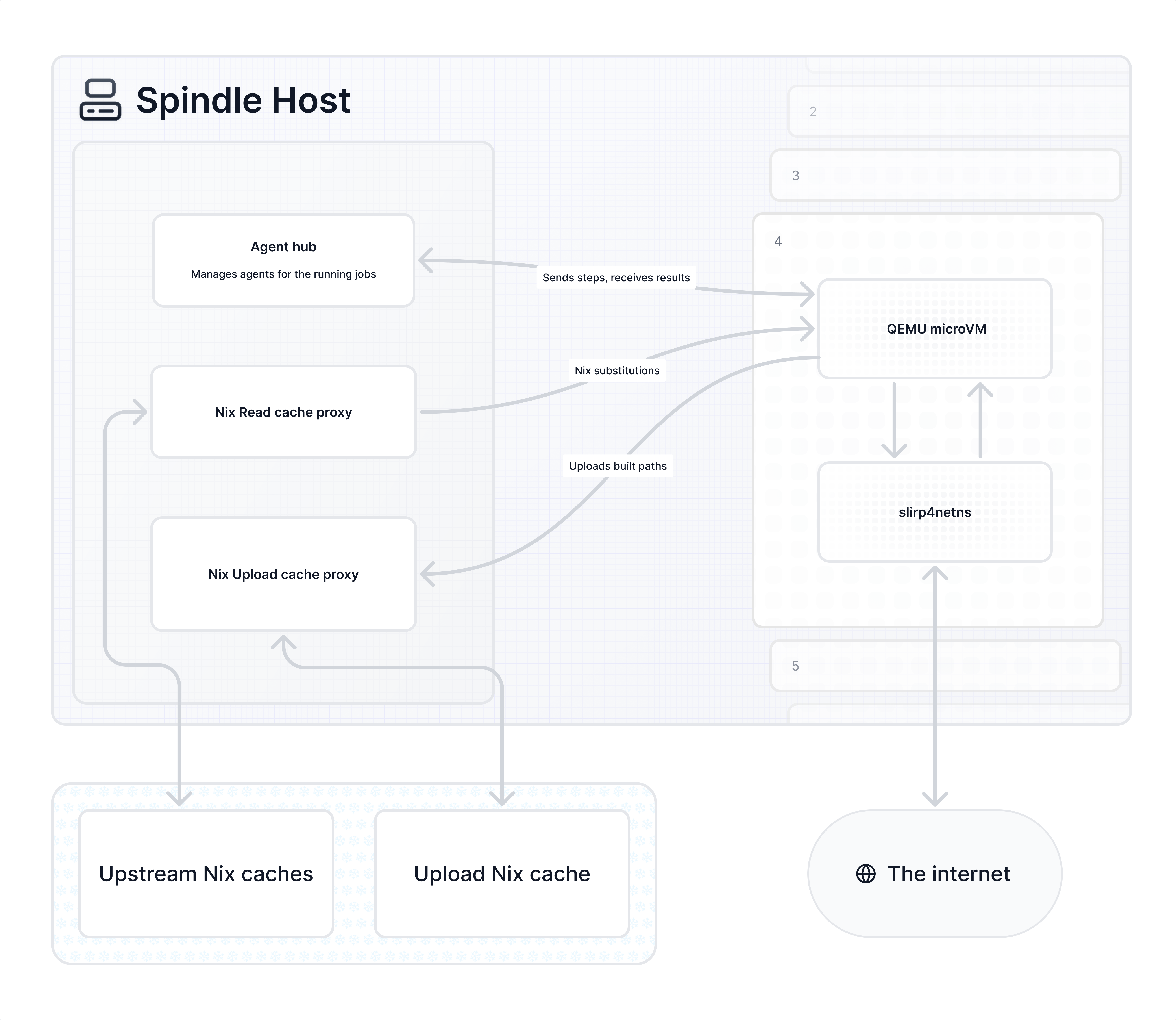
97
98## Two kinds of images
99
100There are two "flavours" of image you can boot, and they're aimed at fairly
101different people.
102
103The first is **NixOS images**. These are the interesting ones: because the whole
104guest is built with Nix, you can configure it from your workflow file directly.
105Things like `dependencies`, `services`, `virtualisation` (e.g. Docker),
106`registry` and `caches` are all written right there in the YAML, and the guest
107agent builds and activates that config before any of your steps run. If we've
108built that exact base plus config before, spindle can just hand the guest a
109store path to realize (fetching from whatever cache `spindle` has configured)
110instead of rebuilding it, so the second run is quick.
111
112The second is **non-NixOS images**, which today just means Alpine, but can be
113anything. You don't get the workflow-level NixOS config here (there's no NixOS
114to configure), but if Nix happens to exist inside the image, like it does in our
115Alpine one, it can still talk to the spindle Nix cache just fine.
116
117## An example NixOS workflow
118
119If you've used spindle before, this will look familiar: it's the same manifest
120you already know, just with a few extra keys that the NixOS image understands.
121Here's a workflow that needs Postgres to test against and Docker to build an
122image:
123
124```yaml
125# .tangled/workflows/test.yaml
126engine: microvm
127
128when:
129 - event: ["push", "pull_request"]
130 branch: ["master"]
131
132image: nixos
133
134dependencies:
135 - go
136 - github:nixos/nixpkgs#hello
137
138registry:
139 nixpkgs: github:nixos/nixpkgs/nixos-unstable
140
141caches:
142 https://nix-community.cachix.org: "nix-community.cachix.org-1:mB9FSh9qf2dCimDSUo8Zy7bkq5CX+/rkCWyvRCYg3Fs="
143
144services:
145 postgresql:
146 enable: true
147 ensureDatabases: ["spindle-workflow"]
148 ensureUsers:
149 - name: spindle-workflow
150 ensureDBOwnership: true
151
152virtualisation:
153 docker: true
154
155steps:
156 - name: run tests
157 environment:
158 PGHOST: /run/postgresql
159 command: |
160 docker build -t app .
161 psql -c "select 1"
162 go test ./...
163```
164
165The new keys each do one job:
166
167- **`dependencies`** are the packages your steps get to use. They go into a
168 `mkShellNoCC` devshell that every step sources before it runs, so you get the
169 whole stdenv environment (setup hooks like `pkg-config` wiring up
170 `PKG_CONFIG_PATH`, etc.) and not just the bare binaries. That means you can
171 use a dependency like `openssl` and compile the `openssl-sys` Rust crate
172 without pain! A bare name like `go` is looked up in nixpkgs (same as Nixery),
173 but you can also point at any flake with the `flakeref#attr` syntax, so
174 `github:nixos/nixpkgs#hello` pulls `hello` straight out of that flake.
175- **`registry`** is how you remap the global refs. Here we pin `nixpkgs` to
176 `nixos-unstable`, so now the bare `go` above resolves from unstable. You can
177 alias your own flakes the same way (`myflake: github:me/x`, then
178 `myflake#tool` in `dependencies`).
179- **`caches`** is a map of binary cache URL to its trusted public key. They get
180 wired into the read proxy (more on that just below), so the guest can
181 substitute prebuilt paths from them instead of building everything from
182 scratch.
183
184`services` and `virtualisation` are the interesting parts: they're passed
185straight through to NixOS, so anything you could write in a NixOS config you can
186write here. `services.postgresql.enable` brings Postgres up before any of your
187steps run.
188
189Since steps run as the `spindle-workflow` user, naming a database after that
190user with `ensureDBOwnership` is the easy path to a working DB -- Postgres peer
191auth maps the unix user straight to the matching role, so `psql` connects over
192the socket with no password and no extra setup (this name-matching is a NixOS
193requirement for `ensureDBOwnership`, if you want a differently named DB you'd
194grant access yourself).
195
196`virtualisation.docker: true` is shorthand for `virtualisation.docker.enable =
197true`, which gets you a real Docker daemon inside the VM. By the time your first
198step runs, Postgres is listening and the Docker socket is there, no sidecar
199dance, it's just part of the machine.
200
201(`true` works as shorthand for `.enable = true` anywhere an `enable` option
202exists, so most "just turn this on" services are a one-liner!)
203
204## The architecture
205
206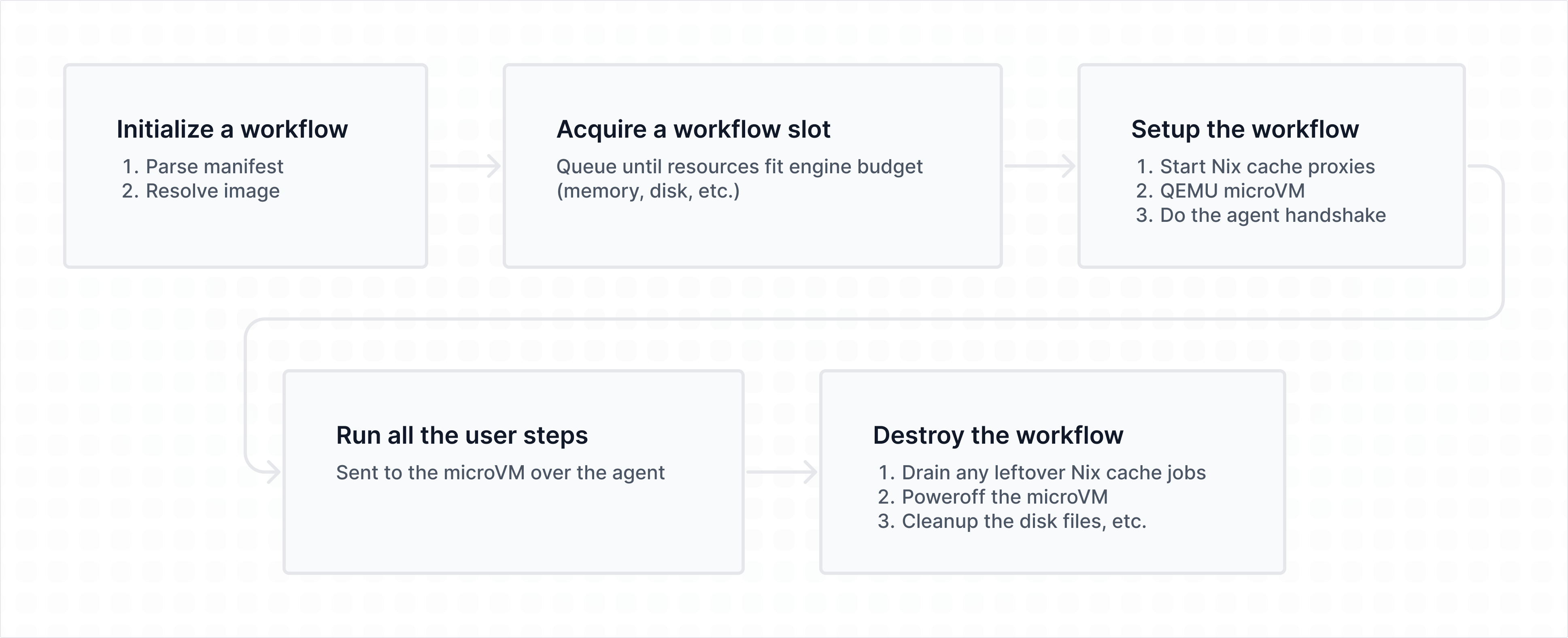
207
208### Nix cache, both ways
209
210Spindle talks to its Nix cache through two proxies that run on the host, so the
211guest never needs credentials or direct network access to reach it. Like the
212agent, they use vsock to talk to spindle.
213
214The read proxy fans out to the configured substituters plus any caches you
215listed in your workflow, so when the guest needs to realize a store path it asks
216the proxy and the proxy fetches it. The request is sent concurrently to the read
217caches, so the one that answers it first wins.
218
219The upload proxy goes the other way: any path built inside the guest gets pushed
220back out to spindle's Nix cache (if one is configured), so the next workflow
221that needs it doesn't have to build it again. Any paths that already exist on
222any of the configured read caches won't be uploaded. As the agent reports
223built paths, they're queued and uploaded in the background while the rest of the
224workflow keeps running, so uploads overlap with work instead of blocking it. If
225any are still in flight when we reach VM teardown, the workflow waits until
226everything has drained.
227
228Spindle can be configured to use `http`, `ssh-ng` or `ssh` URLs as a binary
229cache to upload to, so for example, `ssh-ng://localhost` would just upload to
230the local Nix store on the machine that the spindle runs on! `ssh-ng` and `ssh`
231require Nix to be present in PATH so that the spindle can use `nix copy` to
232upload to them, but if you are using a binary cache that supports `http` (for
233example, [ncps](https://github.com/kalbasit/ncps)) Nix does not need to be
234present.
235
236### Building the images
237
238Image builds are done with Nix. For NixOS we lean on
239[microvm.nix](https://github.com/microvm-nix/microvm.nix) and layer our own bits
240on top (stripping down kernel modules, configuring users, etc.). For Alpine
241there's a smallish Nix definition that fetches the kernel, the initrd and the
242kernel modules, sets up an init script that configures the machine on boot,
243copies in the dependencies we want (`nix`, `git`, etc.) and compresses the whole
244rootfs into a squashfs.
245
246None of this *has* to be Nix, though. As far as spindle is concerned an image is
247valid as long as a few things hold: a guest agent (that implements `agentproto`)
248is present and gets started on boot, a `spindle-workflow` user exists, and the
249work directory is set up at `/workspace`. That can be built however you like.
250
251### Finding an image
252
253Every built image ships a `spec.json` next to its artifacts. The spec is the
254whole contract: where the kernel and initrd and read-only store disk live, the
255boot args, how much memory and how many vCPUs to give it, the shell to run steps
256in, the writable volumes, the network interfaces, and the runner-specific knobs
257(machine type, CPU, extra QEMU args). NixOS images also carry a `baseConfigHash`
258identifying the base config baked in (this is the hash of
259`nixosSystem.config.system.build.toplevel.outPath`).
260
261A workflow picks an image with the `image` key at the top level. The name is
262matched literally against what's on disk, we look for a directory called
263`<name>` with a `spec.json` in it, then fall back to a flat `<name>.json`. The
264nice property here is that resolution depends *only* on the name and what's on
265disk, never on the host doing the resolving, so the same workflow resolves to
266the same image on every spindle. If an operator keeps multiple arches side by
267side they can name them `nixos-x86_64`, `alpine-aarch64` and so on (that suffix
268is just part of the name, it's not handled specially). If you want, for example,
269`nixos` to work, you can just symlink `nixos` to `nixos-x86_64`.
270
271Right before launch we double-check the referenced files actually exist
272and that the host has the tools we need: `mkfs.ext4` for the volumes, the
273QEMU binary for the spec's arch, `/dev/kvm` and `/dev/vhost-vsock`, plus
274the `ip` / `mount` / `slirp4netns` / `unshare` toolchain if the image
275wants networking.
276
277### The life of a workflow
278
279A workflow moves through a handful of stages: it gets parsed and its
280image resolved, it waits for a slot, it gets set up, its steps run, and
281then everything is torn down.
282
283The waiting bit matters a lot. Each image declares how much memory, how many
284vCPUs and how much disk it needs, and a workflow has to acquire a slot from a
285resource scheduler before anything boots. The scheduler is work-conserving with
286aging and per-user fairness, so one person submitting a hundred jobs won't
287starve everyone else, and slots don't sit idle if there's work that fits in the
288budget.
289
290Once a slot is acquired, we do the setup. Spindle allocates a random vsock CID
291for the guest and registers it with the agent hub. It creates the per-workflow
292work directory, starts the two cache proxies (described earlier), a DNS proxy
293that resolves through the host and filters out private/special-use addresses,
294then creates the VM: writable volumes become sparse files formatted ext4, the
295store disk is attached read-only, and QEMU is started with `-sandbox on`,
296`-nodefaults`, no display, no monitor, etc. with serial (on boot) /
297`virtio_console` output to a log file and a QMP socket for control.
298
299Then we wait for the machine. We poll QMP until QEMU says the guest is running,
300then wait for the agent's handshake to arrive over vsock from the CID we expect.
301The agent tells us its protocol and versions, and spindle sends back the job id,
302the trusted cache public keys, and the cache and DNS proxy ports. From there
303steps run one at a time as `$shell -lc <command>`, as the unprivileged workflow
304user in `/workspace/repo`, with the right environment and any unlocked secrets.
305If the workflow activates a NixOS config and we've already built that exact base
306plus config, the activation step can realize a cached toplevel store path instead
307of rebuilding. Either way, whether it's building the config fresh or pulling a
308cached toplevel down, that output streams straight into the activation step's log
309as it happens, so you can watch the closure come in instead of staring at a blank
310screen wondering if anything's happening.
311
312Timeouts are cooperative: we work out a deadline from the workflow timeout
313and send it to the guest, with a little grace on our side so the guest
314gets a chance to report the timeout itself rather than us just yanking the
315machine out from under it. And if the VM crashes mid-step we tail the
316serial and QEMU logs into the step's stderr, because "guest agent
317connection lost: EOF" is a genuinely useless thing to read at 2am...
318
319Teardown is the same whether the workflow passed, failed or timed out:
320drain any pending Nix cache uploads, ask the agent to power off, wait for
321QEMU to exit (falling back to a QMP `system_powerdown`, and finally a
322kill if it's being stubborn), then close the proxies and remove the work
323directory.
324
325### Locking down the network
326
327A VM that can reach the host's local network is a VM that can reach things it
328has no business reaching. So QEMU doesn't run in the host's network namespace at
329all. We `unshare` into fresh user, net and mount namespaces first. Inside that
330namespace a small wrapper bind-mounts a resolv.conf pointing at `127.0.0.1` so
331that QEMU's built-in slirp DNS isn't used, then installs blackhole routes for
332every special-use IP range (RFC 6890, so private networks, link-local, loopback,
333etc.) before it execs QEMU. `slirp4netns` then provides the namespace's outbound
334internet connection, with `--disable-host-loopback`, sandbox and seccomp all on.
335QEMU runs *inside* that namespace, and the guest's network card is attached to
336QEMU's own built-in user-mode networking. So every packet from the guest takes
337two hops: guest → QEMU's slirp → the namespace's `slirp4netns` → the internet.
338The guest never sees the host's network and the host's network never sees the
339guest. All of this is done without needing any privileges!
340
341Guest DNS doesn't use either slirp layer. The guest's `/etc/resolv.conf` points
342at shuttle on `127.0.0.1:53`, and shuttle forwards DNS packets over vsock to
343the host-side DNS proxy. That proxy resolves through the host's real resolver
344and strips any answers that point at private or special-use addresses, so guest
345traffic can only ever reach the outside world, never the host or anything on its
346local networks.
347
348### Budgets and cgroups
349
350The scheduler's budget is bookkeeping on its own, it tracks what it's handed
351out, and the runner (QEMU) will ensure that a workflow only gets those. But
352optionally the whole thing (QEMU and slirp4netns both) gets placed in a
353per-workflow cgroup with memory, swap etc. limits, which is an extra enforcement
354layer on top, considering QEMU and slirp4netns themselves also use resources. A
355nice side effect is that when the cgroup OOM-kills the VM we can see that it was
356an OOM and report it as such, instead of surfacing it as a generic crash and
357leaving you guessing.
358
359The spindle itself also gets a cgroup with `memory.min` set, which means that in
360a host OOM situation, it should be the workflows that die first, not the spindle
361itself.
362
363## On the roadmap
364
365A few things that are coming next:
366
367- [firecracker](https://github.com/firecracker-microvm/firecracker) runner
368 support. QEMU microVMs are good and all, but firecracker VMs are more
369 efficient to run concurrently and are leaner overall.
370- ssh-on-fail: when a workflow fails, you should be able to ssh in to debug why.
371 This can be really useful in situations where you need just *a little* bit
372 more info if something unexpected fails so you don't sit around there running
373 the workflow 10 times over.
374
375Feel free to come and ask any questions you might have on https://chat.tangled.org!